
- User Interface
- Open an Account
- Connect to an Account
- Deposits and withdrawals
- Platform Settings
- For Advanced Users
Connect to an Account
To start working with a trading account, you need to connect to it using a login (account number) and password. Two types of account access are available in the trading platform: master and investor. Logging in using the master password gives full rights for working with the account. Investor authorization allows you to see the account status, analyze prices, and work with your own Expert Advisors, but not trade. The Investor access is a convenient tool for demonstrating the trading process on the account.
The trading platform provides the option of extended authentication using SSL certificates.
Click " Login to Trade Account" in the File menu or in the Navigator.
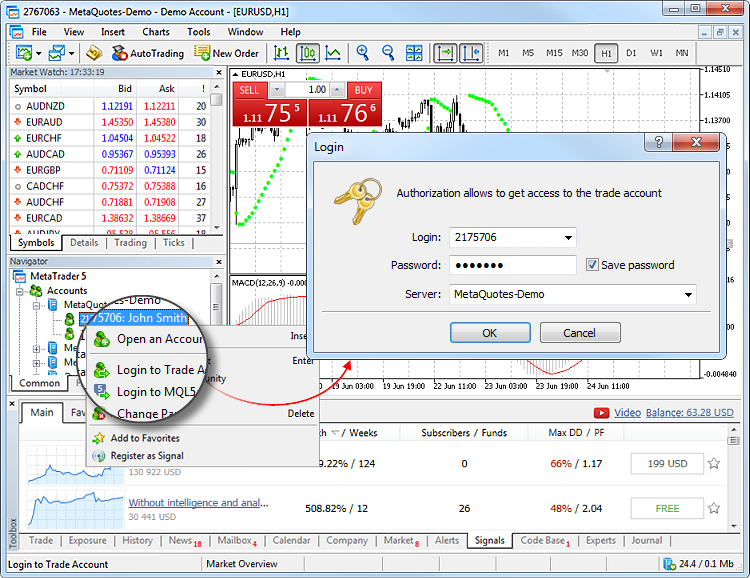
Specify the following data in this window:
- Login — the number of the account used for connection.
- Password — the master or investor password for the account.
- Server — server to connect to. Also you can indicate a server manually. Enter its IP address and port number as [server number]:[port number], for example, 192.168.0.1:443.
Enable the "Save password" option, and the next time you start the platform, the last used account will be automatically connected to the server. Option "Keep personal settings and data at startup" in the platform settings performs the same action.
After specifying all the details, click "OK" to connect.
Forced Change of Password #
After logging in, you may be prompted to change your account's master password. A forced password change, which happens periodically or on your first sign-in, is typically initiated by your broker for security reasons.
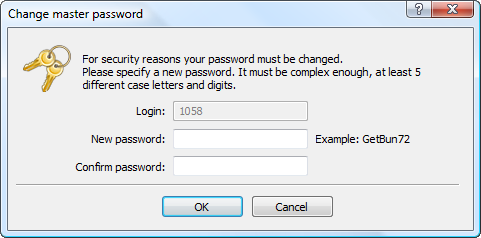
Enter the current master password, enter the new master password and re-enter it to confirm, then click "OK".
The new password must:
- Meet or exceed the length required in the password change dialog.
- Contain four character types: lowercase letter, uppercase letter, number, and special character (#, @, ! etc.). For example: 1Ar#pqkj.
- Differ from the current password.
A forced master password change automatically invalidates the investor, money, and trader passwords. New passwords for these access types can be set in the platform settings.