16 April 2026

MetaTrader 5 Platform Update Build 5800: Redesigned Trading Dialog and Improved Operations with CSV in MetaEditor
This release introduces the first stage of enhancements to the main trading dialog
Terminal
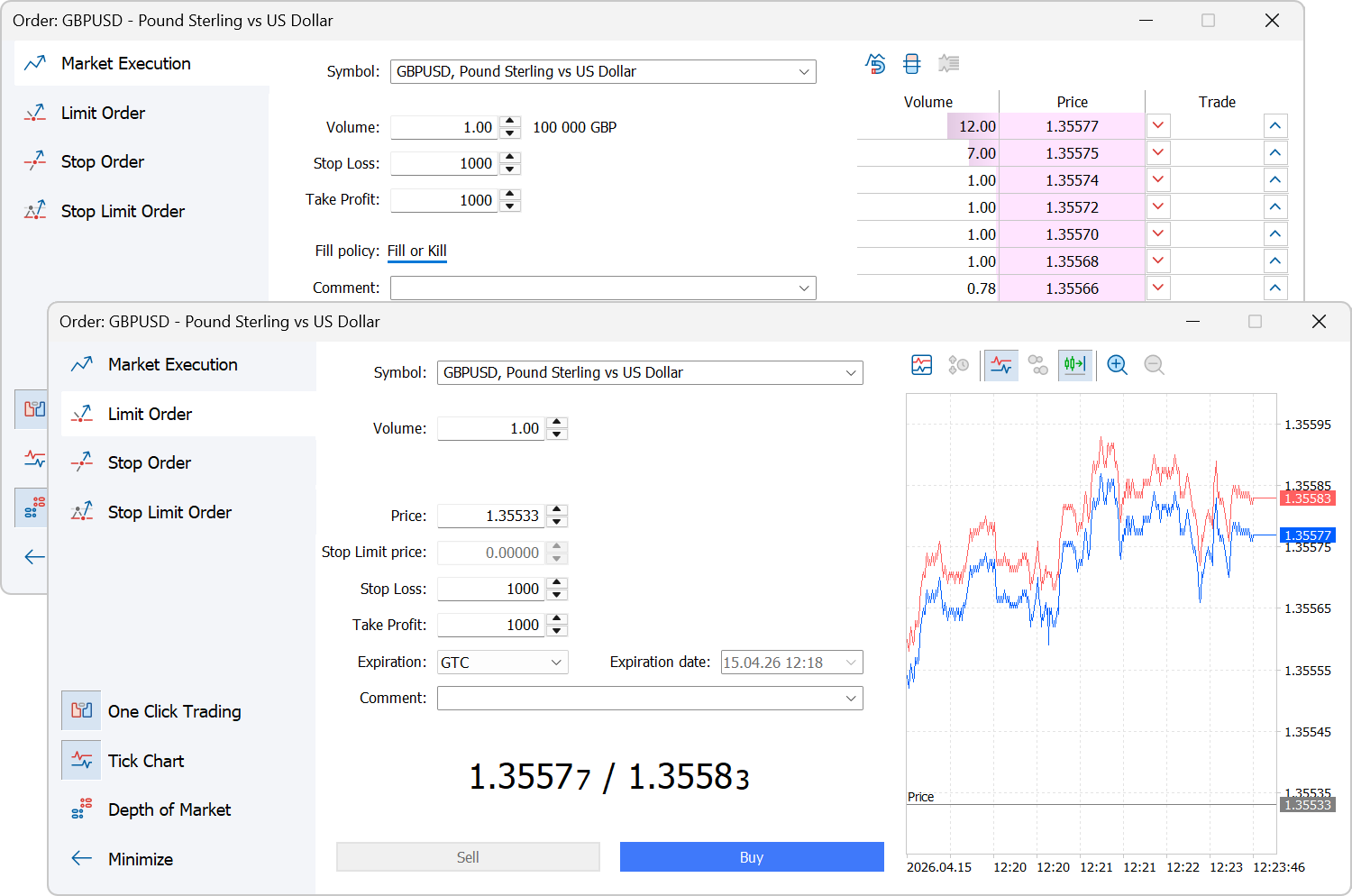
- We have started a comprehensive redesign of the trading dialog to make it more intuitive and functional.
- The dialog now includes a built-in Depth of Market, providing full visibility into market conditions and enabling quick placement of pending orders at specific price levels.
- Order type switching has been moved to a side panel for easier access.
- The side panel now includes one-click trading enable/disable controls. Previously, they were only available in the platform settings.
Upcoming versions will provide further enhancements for stop level placement and risk management.
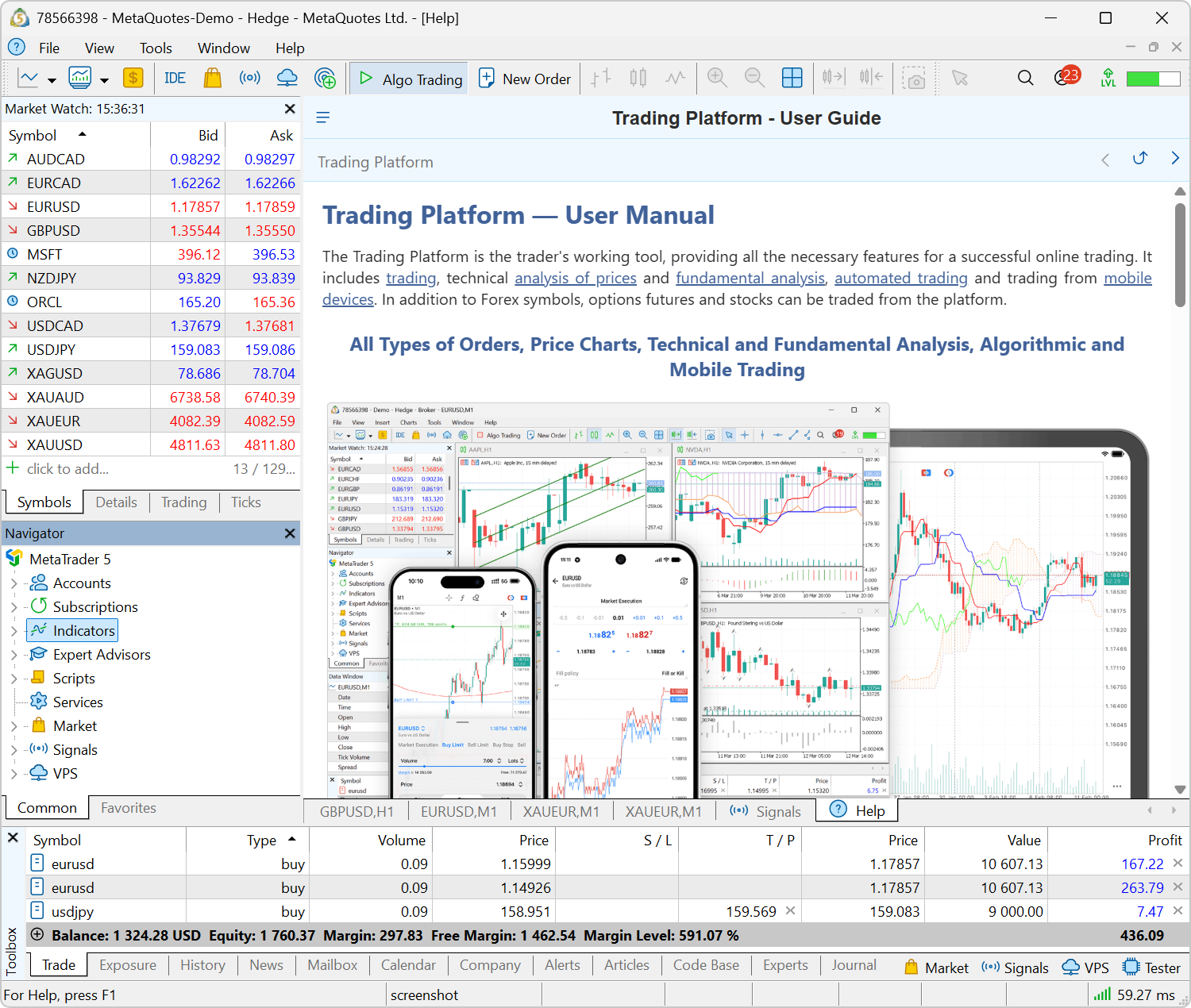
- Updated built-in Help. The built-in help system has been upgraded from the legacy CHM format to a modern web-based engine. Along with this transition, the help interface has been redesigned with updated styles and improved interactivity.
By default, the help window opens in a separate panel within the chart area. If needed, it can be detached and moved outside the platform to free up space for trading instruments.
- Fixed updates for ONNX and OpenBLAS libraries. Required components are now properly checked and downloaded during platform updates.
- Fixed display of the chart position fixing marker.
- Fixed balance drawdown calculation in trading reports. Previously, withdrawals could be incorrectly included.
- Improved the dark theme. We have adjusted some colors for better contrast.
- Fixed saving of proxy connection settings and expanded logging. When a proxy is first used during a session, the following message is logged:
connecting through HTTP proxy [server]:[port] - Updated Uzbek localization — now uses the Latin script.
MQL5
- Added new OpenBLAS methods for L1 trend filtering, enabling fast and reproducible extraction of trend components from time series.
Where to use
- Piecewise linear trends instead of smooth averaging: the L1 filter reduces noise and short-term fluctuations without blurring regime changes, representing trends as linear segments.
- Automatic detection of turning points: changes in trend slope are identified naturally due to sparsity in second differences—particularly useful for financial time series.
- Normalized regularization parameter via λmax: the λ parameter can now be defined in relative terms (as a fraction of λmax). This makes it easier to transfer settings across symbols, timeframes, and history dataset with different lengths.
New methods
- L1TrendFilterLambdaMax — calculates the maximum regularization value (λmax) at which the solution becomes strictly linear (global trend). Returns true/false, with λmax provided via an output parameter.
- L1TrendFilter — computes the L1 trend for a given λ. Supports relative=true, where λ is defined within the range [0…1] as a fraction of λmax.
- Fixed data requests via CopyRates. Requests outside available history now correctly return error code -1.
- Expanded CUDA support for ONNX models. The following architectures can currently be used:
- Turing: Nvidia 1660, RTX 2080/2070/2060, T4, Quadro RTX
- Ampere: A100, RTX 3090/3080/3070
- Ada Lovelace: RTX 4090/4080/4070, L40, L4
- Hopper: H100, H200
- Blackwell: B100, B200, B20, RTX 5090/5080/5070
- Improved WebRequest operations for long-running requests using Keep-Alive.
MetaEditor
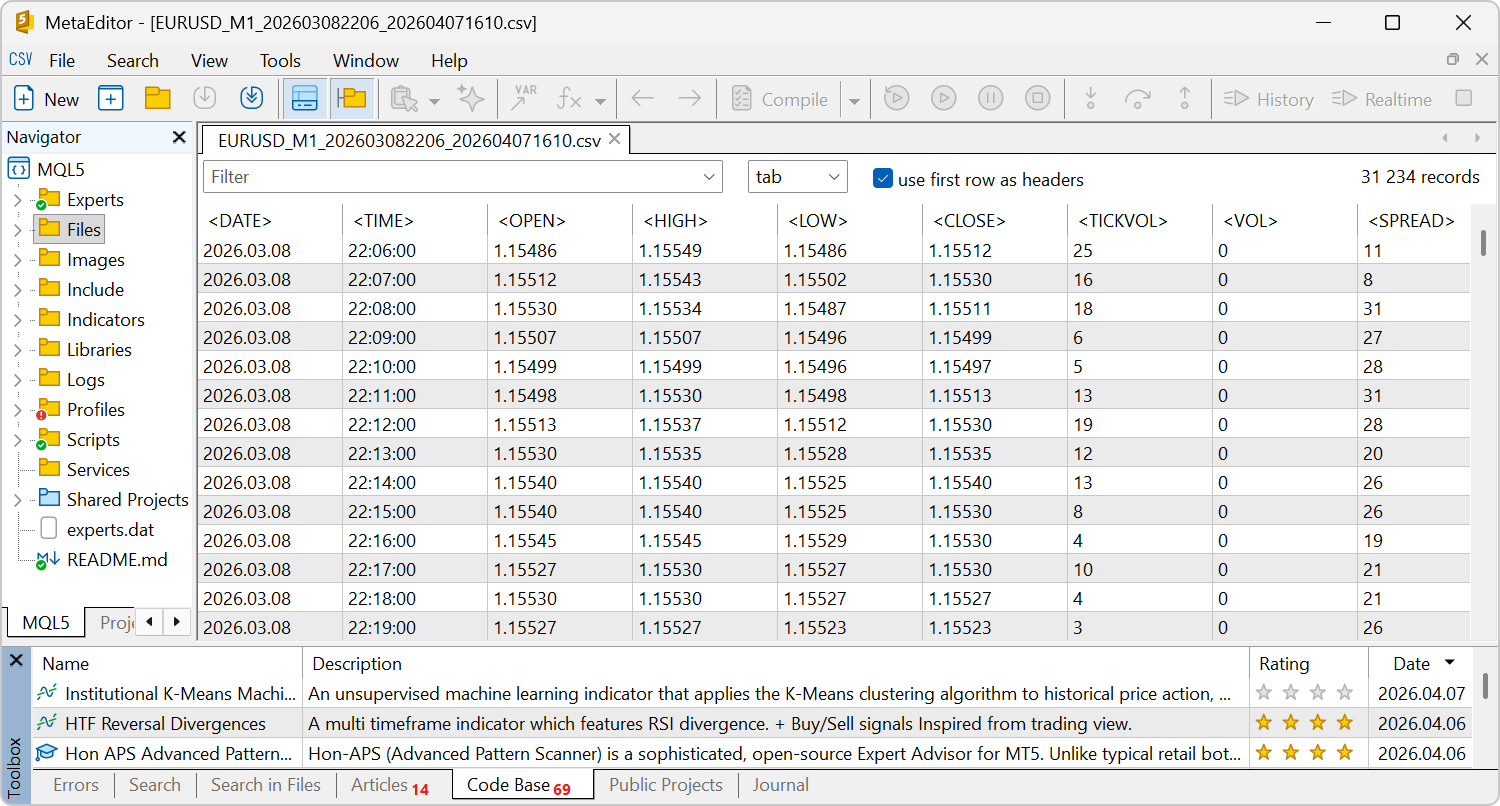
- Added table view for CSV files.
When opening CSV files, the editor now automatically displays them in a structured table format. You can filter data, sort by columns, and delete rows using the context menu.
Any character can be used as a delimiter, including commas, semicolons, tabs, and spaces. If automatic detection is incorrect, the delimiter can be set manually.
- Improved setting of default compilation mode. If your CPU supports the AVX2 instruction set, the editor automatically sets the appropriate compilation mode for MQL5 applications. This ensures optimal performance.
- Updated the default source file encoding format. Files are now saved in UTF-8 without BOM, which ensures correct display in MQL5 Algo Forge.
- Fixed the "repository not owned by current user" error when using MQL5 Algo Forge cloud storage.
Signals
- Fixed delays in signal copying when the subscriber account lacks the exchange rate required for calculating the copy ratio.
When determining trade volumes, the system considers the balance ratio between subscriber and provider accounts. If deposit currencies differ, a corresponding conversion rate is required. If the needed conversion rate is unavailable, the system assumes equal balances and logs the warning:no conversion rate for the deposit currency of provider and subscriberPreviously, after this warning, users could experience delays in trade copying. This issue has now been resolved.
Tester
- Fixed CopyTicksRange behavior. Requests for symbols other than the main testing symbol previously returned error 4401.
- Fixed import of custom trading settings. These settings can now be edited after import.
MetaTrader 5 Web Terminal
- Fixed positioning of the indicator adding dialog. It could previously appear at the edge of the screen for some users.
- Fixed display of trading session start times in instrument specifications.
- Fixed double-click behavior on objects and the vertical scale. It now opens properties and resets zoom to default.
Earlier publications:
- MetaTrader 5 Platform Update Build 5660: Improvements and Fixes
- New MetaTrader 5 Platform Version Build 5640: Dark Theme Improvements and Markdown Support in MetaEditor
- New MetaTrader 5 Build 5572: ONNX and Chart Rendering Improvements
- New MetaTrader 5 Platform Build 5430: Enhanced Charts Powered by Blend2D
- MetaTrader 5 Platform Update build 5370: Web Terminal improvements