
- Launch
- Settings
- Integration with other IDEs
- Main menu
- Toolbars
- Workspace
- Projects and MQL5 Storage
- MQL4/MQL5 Wizard
- Developing programs
- Working with SQL data bases
- Working with machine learning models
- Example of developing a program
- MetaEditor environment folders
- MQL5.community: Community of Traders
- Built-in help
- Articles on the development of trading applications
- Trading platform video guides
Built-in help
MetaEditor features the built-in MetaQuotes Language 4 and 5 (MQL4 and MQL5) help providing complete description of all its elements and constructions. The help (or MQL5 Reference) is context-based. Place the cursor over any language element in a source code and press F1 – the required documentation section will be opened immediately:
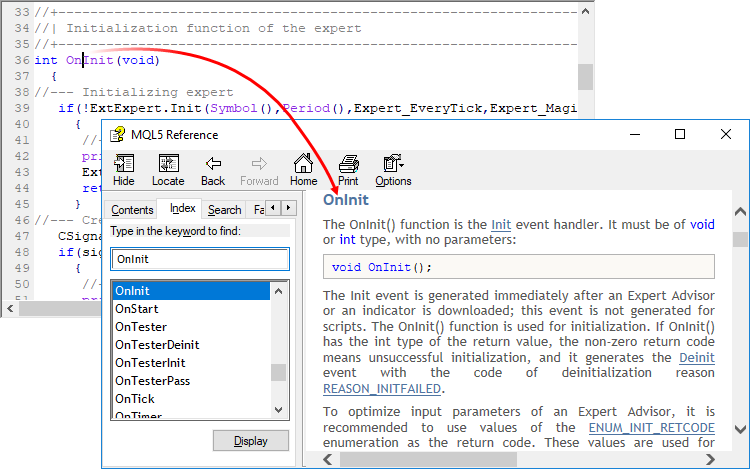
You can also open the built-in Help using the "MQL4/MQL5 Reference" in the Help menu.
In addition to the built-in Help, MetaEditor also features the context-based search on MQL5.community. Place the cursor over any language element in a source code and press Ctrl+F1 – all detected website materials will be displayed on the Search tab of the Toolbox window.
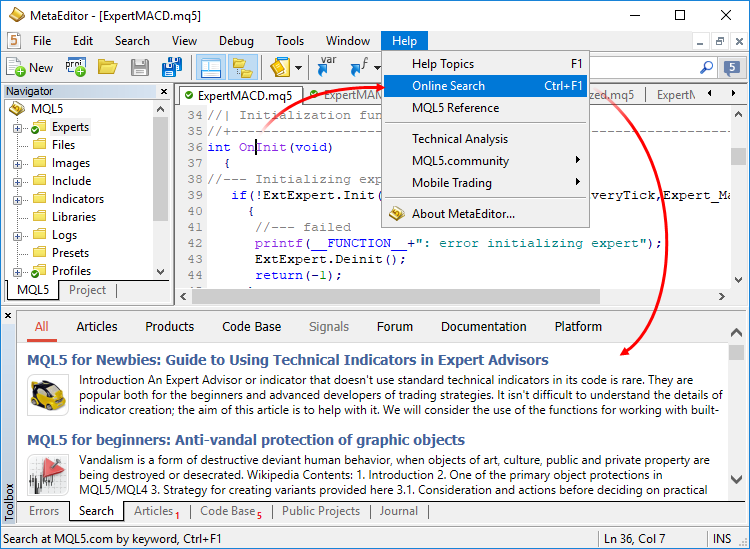
You can also perform a search on MQL5.community via the Search toolbar .