---
title: "パスワード管理 - 口座 - MetaTrader 5 Android版 - Android 版MetaTrader 5のヘルプ"
description: "MetaTrader 5 Android版モバイルプラットフォームでは取引口座のパスワードの変更が可能です。[ 口座 ]... - パスワード管理 - 口座 - Android 版MetaTrader 5のヘルプ"
image: "https://www.metatrader5.com/i/logo_metatrader5.png"
url: "https://www.metatrader5.com/ja/mobile-trading/android/help/settings_accounts/account_passwords"
---
[Android 版MetaTrader 5のヘルプ](https://www.metatrader5.com/ja/mobile-trading/android/help) → [口座](https://www.metatrader5.com/ja/mobile-trading/android/help/settings_accounts) → パスワード管理
| # パスワード管理
MetaTrader 5 Android版モバイルプラットフォームでは取引口座のパスワードの変更が可能です。[[口座](https://www.metatrader5.com/ja/mobile-trading/android/help/settings_accounts)] 画面に移動し、ウィンドウの右上隅の![\[メニュー\]](https://www.metatrader5.com/i/help/android/en/accounts_menu_button.png)ボタンをタップするか、お使いのデバイスの[メニュー]ボタンを押します。その後、[パスワードの変更]をタップします。
\| すべてのパスワード変更は、現在の口座(現在接続している口座)に適用されます。 \|
\| --- \|
ここでは、次のデータを指定します。
- 現在のパスワード — 口座の現在のマスターパスワードを指定します。
- マスターパスワードの変更/閲覧用パスワードの変更 — パスワードを変更する口座を選択します。 | 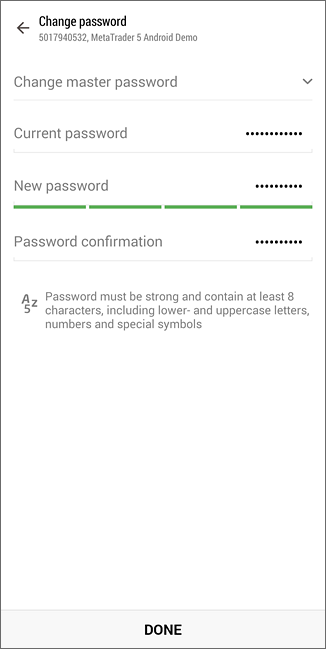 |
| --- | --- |
| すべてのパスワード変更は、現在の口座(現在接続している口座)に適用されます。 | |
| - 新しいパスワード— 口座の新しいパスワードを指定します。
- パスワード確認 — 入力エラーを避けるために新しいパスワードを再度入力します。
新しいパスワードには次の要件があります。
- パスワード変更ダイアログに表示される長さの要件を満たす必要があります。
- 小文字、大文字、数字、[特殊文字](https://learn.microsoft.com/en-us/style-guide/a-z-word-list-term-collections/term-collections/special-characters)(#、@、!など)の4種類の文字を含める必要があります(例:1Ar#pqkj)。
- 以前のパスワードと異なる必要があります。 | |
|  | ## パスワードの強制変更 [#](#change_password)
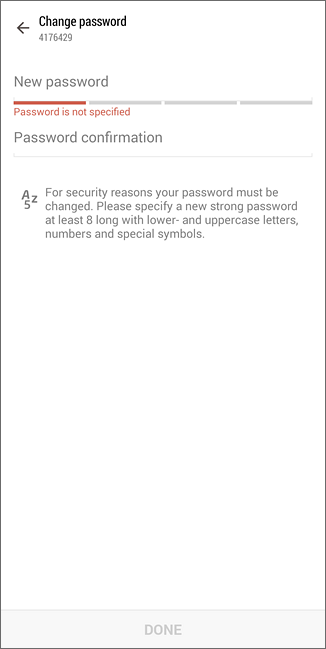
承認時に、口座のマスターパスワードを変更するように要請されることがあります。パスワードの強制変更は、取引サーバの管理者によって有効にされることがあります。最初に接続したとき、または定期的に、マスターパスワードを強制的に変更するメカニズムは、安全性を向上させます。
現在のマスターパスワードを[現在のパスワード]フィールドに入力します。新しいパスワードを[新しいパスワード]に入力し、[パスワード確認]に再度入力します。 |
| > マスターパスワードが強制的に変更された場合、口座の閲覧用パスワードもリセットされます。新しい閲覧用パスワードを設定するには、上記のパスワード変更機能を使用します。 | |
| ## 保存されたパスワードの削除 [#](#clear)
[口座に接続するときに](https://www.metatrader5.com/ja/mobile-trading/android/help/settings_accounts/account_connect)[パスワードを保存]オプションが有効になっていると、アプリケーションはパスワードを保存して、接続するたびにパスワードを入力する必要がなくなります。[保存したパスワードのクリア]はそのようなパスワードを消去するので、次回に接続するときに再度入力される必要があります。 | 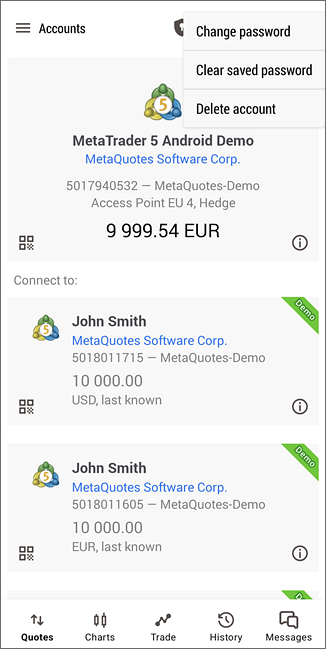 |
## In this section
- [デモ口座の開設](https://www.metatrader5.com/ja/mobile-trading/android/help/settings_accounts/account_open)
- [ライブ口座の開設](https://www.metatrader5.com/ja/mobile-trading/android/help/settings_accounts/account_real)
- [口座接続](https://www.metatrader5.com/ja/mobile-trading/android/help/settings_accounts/account_connect)
- [入出金](https://www.metatrader5.com/ja/mobile-trading/android/help/settings_accounts/payments)
- [拡張認証](https://www.metatrader5.com/ja/mobile-trading/android/help/settings_accounts/extended_authorization)
- パスワード管理
- [OTP](https://www.metatrader5.com/ja/mobile-trading/android/help/settings_accounts/otp)
```json
{"@context": "https://schema.org", "@type": "BreadcrumbList", "itemListElement": [ {"@type": "ListItem", "position": 1, "item": {"@id": "https://www.metatrader5.com/ja/mobile-trading/android/help", "name": "Android 版MetaTrader 5のヘルプ"}}, {"@type": "ListItem", "position": 2, "item": {"@id": "https://www.metatrader5.com/ja/mobile-trading/android/help/settings_accounts", "name": "口座"}}, {"@type": "ListItem", "position": 3, "item": {"@id": "https://www.metatrader5.com/ja/mobile-trading/android/help/settings_accounts/account_passwords", "name": "パスワード管理"}} ]}
{ "@context": "https://schema.org", "@type": "FAQPage", "mainEntity": [{ "@type": "Question", "name": "MetaTrader 5: パスワード管理", "acceptedAnswer": { "@type": "Answer", "text": "MetaTrader 5 Android版モバイルプラットフォームでは取引口座のパスワードの変更が可能です。[ 口座 ] 画面に移動し、ウィンドウの右上隅のボタンをタップするか、お使いのデバイスの[メニュー]ボタンを押します。その後、[パスワードの変更]をタップします..." } }] }
```