---
title: "アングルトレンド - 線 - オブジェクト - チャート - MetaTrader 5 Android版 - Android 版MetaTrader 5のヘルプ"
description: "... - アングルトレンド - 線 - オブジェクト"
image: "https://www.metatrader5.com/i/logo_metatrader5.png"
url: "https://www.metatrader5.com/ja/mobile-trading/android/help/chart/objects/lines/trend_line_angle"
---
[Android 版MetaTrader 5のヘルプ](https://www.metatrader5.com/ja/mobile-trading/android/help) → [チャート](https://www.metatrader5.com/ja/mobile-trading/android/help/chart) → [オブジェクト](https://www.metatrader5.com/ja/mobile-trading/android/help/chart/objects) → [線](https://www.metatrader5.com/ja/mobile-trading/android/help/chart/objects/lines) → アングルトレンド
| # アングルトレンド
アングルトレンドを描画するには、このオブジェクトを選択し、チャートをタップして線の最初の点を選択し、ドラッグして目的の方向に線を描画します。始点からの時間軸と価格軸に沿った距離及び始点を通して引かれた横線からの斜線を示す追加的なパラメータが、終点の近くに表示されます。 | 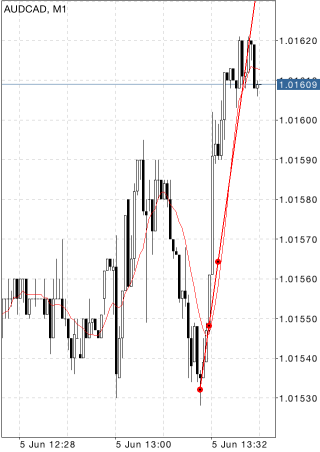 |
| --- | --- |
|  | ## パラメータ
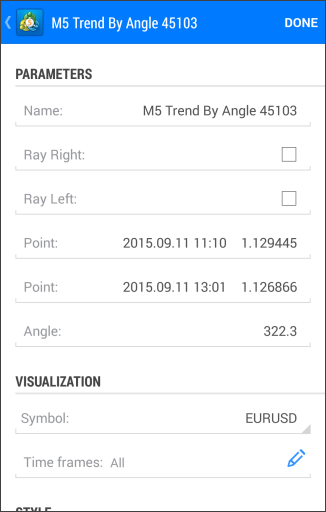
アングルトレンドのパラメータは下記の通りです。
- ポイント — 始点の座標(価格軸の日付/値)
- ポイント — 終点の座標(価格軸の日付/値)
- 角度 — 始点を通して引かれた横線からのトレンドラインの傾斜
- 右に延長 — トレンドラインの右側への無限延長
- 左に延長 — トレンドラインの左側への無限延長
オブジェクトに共通なパラメータは[別のセクション](https://www.metatrader5.com/ja/mobile-trading/android/help/chart/objects#properties)で説明されています。 |
## In this section
- [横線](https://www.metatrader5.com/ja/mobile-trading/android/help/chart/objects/lines/hor_line)
- [縦線](https://www.metatrader5.com/ja/mobile-trading/android/help/chart/objects/lines/vert_line)
- [トレンドライン](https://www.metatrader5.com/ja/mobile-trading/android/help/chart/objects/lines/trend_line)
- アングルトレンド
- [サイクルライン](https://www.metatrader5.com/ja/mobile-trading/android/help/chart/objects/lines/cycle_lines)
- [矢印線](https://www.metatrader5.com/ja/mobile-trading/android/help/chart/objects/lines/arrowed_line)
```json
{"@context": "https://schema.org", "@type": "BreadcrumbList", "itemListElement": [ {"@type": "ListItem", "position": 1, "item": {"@id": "https://www.metatrader5.com/ja/mobile-trading/android/help", "name": "Android 版MetaTrader 5のヘルプ"}}, {"@type": "ListItem", "position": 2, "item": {"@id": "https://www.metatrader5.com/ja/mobile-trading/android/help/chart", "name": "チャート"}}, {"@type": "ListItem", "position": 3, "item": {"@id": "https://www.metatrader5.com/ja/mobile-trading/android/help/chart/objects", "name": "オブジェクト"}}, {"@type": "ListItem", "position": 4, "item": {"@id": "https://www.metatrader5.com/ja/mobile-trading/android/help/chart/objects/lines", "name": "線"}}, {"@type": "ListItem", "position": 5, "item": {"@id": "https://www.metatrader5.com/ja/mobile-trading/android/help/chart/objects/lines/trend_line_angle", "name": "アングルトレンド"}} ]}
{ "@context": "https://schema.org", "@type": "FAQPage", "mainEntity": [{ "@type": "Question", "name": "MetaTrader 5: アングルトレンド", "acceptedAnswer": { "@type": "Answer", "text": " アングルトレンドを描画するには、このオブジェクトを選択し、チャートをタップして線の最初の点を選択し、ドラッグして目的の方向に線を描画します。始点からの時間軸と価格軸に沿った距離及び始点を通して引かれた横線からの斜線を示す追加的なパラメータが、終点の近くに表示されます..." } }] }
```