---
title: "等距離チャンネル - チャンネル - オブジェクト - チャート - MetaTrader 5 Android版 - Android 版MetaTrader 5のヘルプ"
description: "等距離チャンネルは、終値の最大値と最小値を接続する2本の平行な トレンドライン... - 等距離チャンネル - チャンネル - オブジェクト"
image: "https://www.metatrader5.com/i/logo_metatrader5.png"
url: "https://www.metatrader5.com/ja/mobile-trading/android/help/chart/objects/channels/equidistant_channel"
---
[Android 版MetaTrader 5のヘルプ](https://www.metatrader5.com/ja/mobile-trading/android/help) → [チャート](https://www.metatrader5.com/ja/mobile-trading/android/help/chart) → [オブジェクト](https://www.metatrader5.com/ja/mobile-trading/android/help/chart/objects) → [チャンネル](https://www.metatrader5.com/ja/mobile-trading/android/help/chart/objects/channels) → 等距離チャンネル
| # 等距離チャンネル
等距離チャンネルは、終値の最大値と最小値を接続する2本の平行な[トレンドライン](https://www.metatrader5.com/ja/mobile-trading/android/help/chart/objects/lines/trend_line)です。市場価格が飛び上がり、トレンド方向のチャンネルを形成する天井と底を描きます。チャンネルの早期発見は、利益と損失の推定を可能にするトレンド方向の変化を含む、貴重な情報を与えることができます。
## 描画
等距離のチャンネルを描画するには、このオブジェクトを選択します。 | 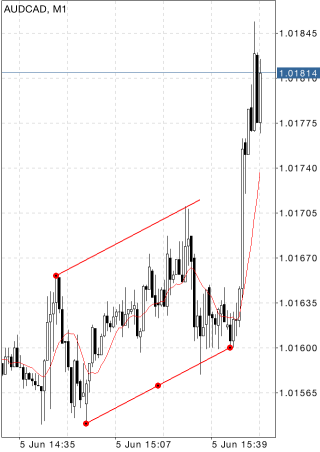 |
| --- | --- |
| その後、画面に触れ、指をドラッグしてチャンネルを必要な方向に描き、幅を設定します。始点からの時間軸と価格軸に沿った距離を示す追加的なパラメータが、チャンネルの下の境界トの近くに表示されます。
## 管理
メインチャンネル線には、ドラッグ出来る点が3つがあります。1番目及び3番目の点は、チャンネルの幅と上下境界の長さと方向を変更するのに使用されます(境界の長さは反対方向に比例して変更されます。)2番目の点は、大きさを変更せずにチャンネルを移動するのに使用されます。3番目の点は、チャンネル全体の長さと方向の変更にも使用されます。2番目のチャンネル線の境界は、2番目のチャンネル線上の点の移動によってメイン線と関係なく移動できます。 | |
|  | ## パラメータ
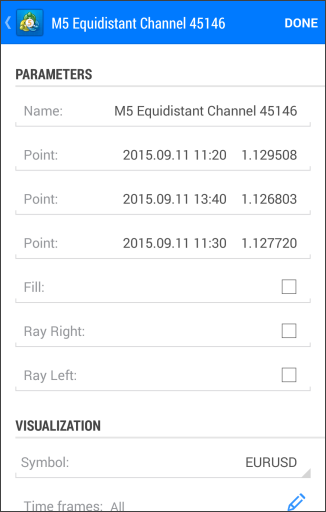
等距離チャンネルのパラメータは下記の通りです。
- ポイント — メイン線の始点(アンカー)の座標(価格軸の日付/値)
- ポイント — メイン線の終点(移動点)の座標(価格軸の日付/値)
- ポイント — 2番目の線の点の座標(価格軸の日付/値)
- 右に延長 — チャンネルの右側への無限延長
- 左に延長 — チャンネルの左側への無限延長
- 塗りつぶし — チャンネル内を塗りつぶす/塗りつぶさない
オブジェクトに共通なパラメータは[別のセクション](https://www.metatrader5.com/ja/mobile-trading/android/help/chart/objects#properties)で説明されています。 |
## In this section
- 等距離チャンネル
- [標準偏差チャンネル](https://www.metatrader5.com/ja/mobile-trading/android/help/chart/objects/channels/stddev_channel)
- [回帰チャンネル](https://www.metatrader5.com/ja/mobile-trading/android/help/chart/objects/channels/regression_channel)
- [アンドリューズピッチフォーク](https://www.metatrader5.com/ja/mobile-trading/android/help/chart/objects/channels/andrews_pitchfork)
```json
{"@context": "https://schema.org", "@type": "BreadcrumbList", "itemListElement": [ {"@type": "ListItem", "position": 1, "item": {"@id": "https://www.metatrader5.com/ja/mobile-trading/android/help", "name": "Android 版MetaTrader 5のヘルプ"}}, {"@type": "ListItem", "position": 2, "item": {"@id": "https://www.metatrader5.com/ja/mobile-trading/android/help/chart", "name": "チャート"}}, {"@type": "ListItem", "position": 3, "item": {"@id": "https://www.metatrader5.com/ja/mobile-trading/android/help/chart/objects", "name": "オブジェクト"}}, {"@type": "ListItem", "position": 4, "item": {"@id": "https://www.metatrader5.com/ja/mobile-trading/android/help/chart/objects/channels", "name": "チャンネル"}}, {"@type": "ListItem", "position": 5, "item": {"@id": "https://www.metatrader5.com/ja/mobile-trading/android/help/chart/objects/channels/equidistant_channel", "name": "等距離チャンネル"}} ]}
{ "@context": "https://schema.org", "@type": "FAQPage", "mainEntity": [{ "@type": "Question", "name": "MetaTrader 5: 等距離チャンネル", "acceptedAnswer": { "@type": "Answer", "text": "等距離チャンネルは、終値の最大値と最小値を接続する2本の平行な トレンドライン です。市場価格が飛び上がり、トレンド方向のチャンネルを形成する天井と底を描きます。チャンネルの早期発見は、利益と損失の推定を可能にするトレンド方向の変化を含む、貴重な情報を与えることができます..." } }] }
```