---
title: "News - MetaTrader 5 for iPhone - MetaTrader 5 iPhone/iPad Help"
description: "In this section, you can work with news received in the mobile platform. The list displays news headers, categories (for... - News - MetaTrader 5 iPhone/iPad Help"
image: "https://www.metatrader5.com/i/logo_metatrader5.png"
url: "https://www.metatrader5.com/en/mobile-trading/iphone/help/settings_news"
---
[MetaTrader 5 iPhone/iPad Help](https://www.metatrader5.com/en/mobile-trading/iphone/help) → News
| # News
In this section, you can work with news received in the mobile platform.
The list displays news headers, categories (for example, MQL5 Articles English), as well as arrival time. Tap the newsletter header to view it.
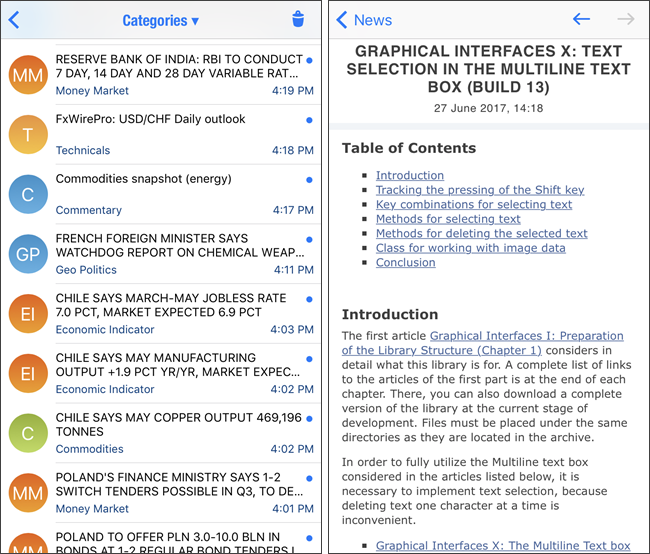
The headers of unread news in the list are displayed in bold.
\| - The set of received news depends on a brokerage company.
- News can be enabled/disabled in [About](https://www.metatrader5.com/en/mobile-trading/iphone/help/settings/settings_about) section. You can select the languages of the incoming news. \|
\| --- \| | |
| --- | --- |
| - The set of received news depends on a brokerage company.
- News can be enabled/disabled in [About](https://www.metatrader5.com/en/mobile-trading/iphone/help/settings/settings_about) section. You can select the languages of the incoming news. | |
| ## News Categories [#](#category)
Various financial newsletters can be delivered to the platform. For convenience, they are divided into categories according to the source and subject.
You may choose to only receive separate newsletters by setting up categories. Tap the corresponding button at the top of the window and select the topics that interest you. | 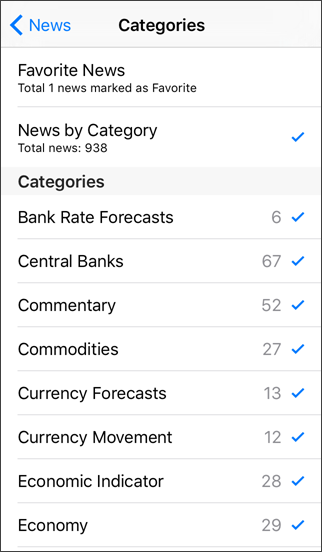 |
|  | ## Favorite News
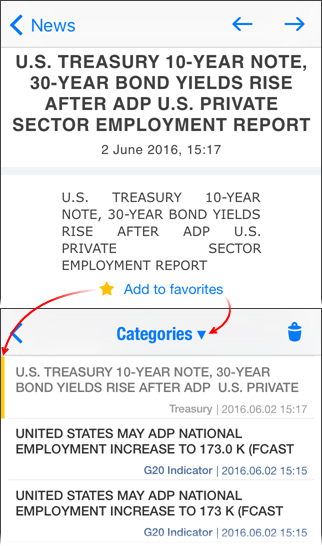
If you like a newsletter, you can easily get back to it whenever you need this. You can mark such a newsletter as Favorite.
All favorite newsletters are added to a separate category.
In order to see previously marked newsletters, enable the "Favorite News" category, and turn off all other categories.
Favorite newsletters are marked with a yellow stripe in the news list. |
| ## Deleting news
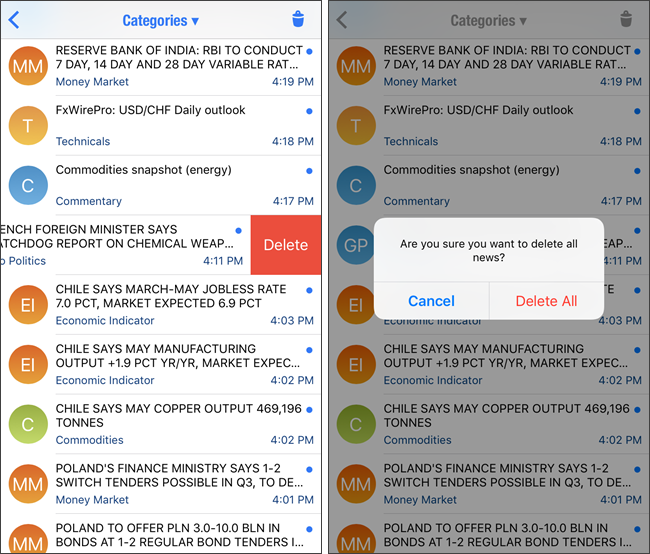
To delete one newsletter, swipe its title from right to left. Delete button will appear after that. To delete all the news, tap  in the upper right corner of the screen.
 | |
## In this section
- [Getting Started](https://www.metatrader5.com/en/mobile-trading/iphone/help/getting_started)
- [Quotes](https://www.metatrader5.com/en/mobile-trading/iphone/help/quotes)
- [Depth of Market](https://www.metatrader5.com/en/mobile-trading/iphone/help/depth_of_market)
- [Chart](https://www.metatrader5.com/en/mobile-trading/iphone/help/chart)
- [Trade](https://www.metatrader5.com/en/mobile-trading/iphone/help/trade)
- [History](https://www.metatrader5.com/en/mobile-trading/iphone/help/history)
- [Accounts](https://www.metatrader5.com/en/mobile-trading/iphone/help/settings_accounts)
- [Mailbox](https://www.metatrader5.com/en/mobile-trading/iphone/help/settings_mail)
- News
- [Messages](https://www.metatrader5.com/en/mobile-trading/iphone/help/settings_messages)
- [Push Notifications](https://www.metatrader5.com/en/mobile-trading/iphone/help/push)
- [Settings](https://www.metatrader5.com/en/mobile-trading/iphone/help/settings)
- [iPad Version](https://www.metatrader5.com/en/mobile-trading/iphone/help/ipad)
```json
{"@context": "https://schema.org", "@type": "BreadcrumbList", "itemListElement": [ {"@type": "ListItem", "position": 1, "item": {"@id": "https://www.metatrader5.com/en/mobile-trading/iphone/help", "name": "MetaTrader 5 iPhone/iPad Help"}}, {"@type": "ListItem", "position": 2, "item": {"@id": "https://www.metatrader5.com/en/mobile-trading/iphone/help/settings_news", "name": "News"}} ]}
{ "@context": "https://schema.org", "@type": "FAQPage", "mainEntity": [{ "@type": "Question", "name": "MetaTrader 5: News", "acceptedAnswer": { "@type": "Answer", "text": "In this section, you can work with news received in the mobile platform. The list displays news headers, categories (for example, MQL5 Articles..." } }] }
```