---
title: "Mailbox - MetaTrader 5 for iPhone - MetaTrader 5 iPhone/iPad Help"
description: "This section allows you to work with the MetaTrader 5 internal mail system. All mails sent by a brokerage company are... - Mailbox - MetaTrader 5 iPhone/iPad Help"
image: "https://www.metatrader5.com/i/logo_metatrader5.png"
url: "https://www.metatrader5.com/en/mobile-trading/iphone/help/settings_mail"
---
[MetaTrader 5 iPhone/iPad Help](https://www.metatrader5.com/en/mobile-trading/iphone/help) → Mailbox
| # Mail
This section allows you to work with the MetaTrader 5 internal mail system. All mails sent by a brokerage company are displayed here. Also, you can send an email to the company's administrator via this section.
The email subject, the sender's name and a date are displayed in the list of mails. To view an email, tap on it.
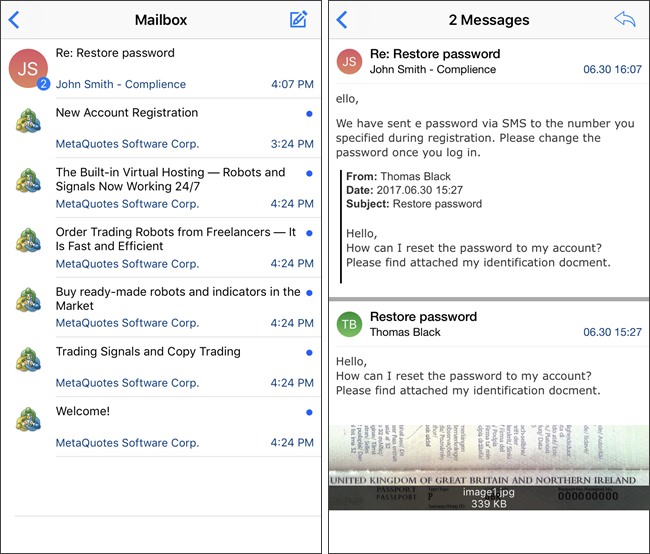
Related emails are combined into threads when you send a reply. This option allows you to easily view all emails on a particular subject. The number of messages in the thread is shown as a sticker.
Unread messages are marked with a blue dot on the right. | |
| --- | --- |
| ## Writing a Mail
To write an email, tap  in the upper right corner of the screen. To reply an incoming email, open it and tap .
Select one of the available administrators in the 'To' field. Next enter the email subject and type the desired text.
You can attach image files and application logs to your email. Tap  and choose an attachment option:
- Camera – open the camera to take a new picture. Before sending, you can view the image or take a new photo if necessary.
- Photo Library – upload a photo from the library. Only the images that you select will be used.
- Document – upload a file from iCloud Drive or other resources (such as Google Drive) available in the device.
- Journal – attach the application logs for the last 10 days. Log files are automatically compressed into a ZIP-archive. | 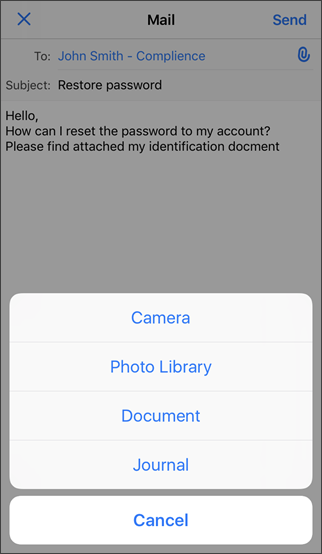 |
| To send an email, tap Send in the upper right corner of the screen. | |
|  | ## Deleting Mails
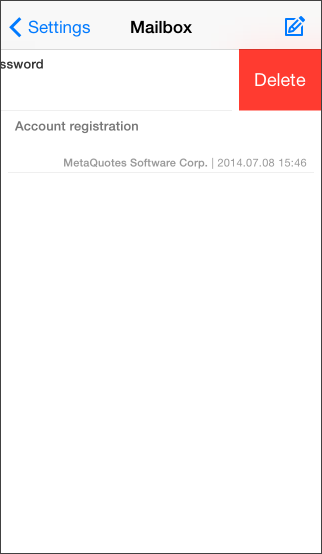
To delete an email, swipe its title in the list from right to left. Delete button will appear after that. |
## In this section
- [Getting Started](https://www.metatrader5.com/en/mobile-trading/iphone/help/getting_started)
- [Quotes](https://www.metatrader5.com/en/mobile-trading/iphone/help/quotes)
- [Depth of Market](https://www.metatrader5.com/en/mobile-trading/iphone/help/depth_of_market)
- [Chart](https://www.metatrader5.com/en/mobile-trading/iphone/help/chart)
- [Trade](https://www.metatrader5.com/en/mobile-trading/iphone/help/trade)
- [History](https://www.metatrader5.com/en/mobile-trading/iphone/help/history)
- [Accounts](https://www.metatrader5.com/en/mobile-trading/iphone/help/settings_accounts)
- Mailbox
- [News](https://www.metatrader5.com/en/mobile-trading/iphone/help/settings_news)
- [Messages](https://www.metatrader5.com/en/mobile-trading/iphone/help/settings_messages)
- [Push Notifications](https://www.metatrader5.com/en/mobile-trading/iphone/help/push)
- [Settings](https://www.metatrader5.com/en/mobile-trading/iphone/help/settings)
- [iPad Version](https://www.metatrader5.com/en/mobile-trading/iphone/help/ipad)
```json
{"@context": "https://schema.org", "@type": "BreadcrumbList", "itemListElement": [ {"@type": "ListItem", "position": 1, "item": {"@id": "https://www.metatrader5.com/en/mobile-trading/iphone/help", "name": "MetaTrader 5 iPhone/iPad Help"}}, {"@type": "ListItem", "position": 2, "item": {"@id": "https://www.metatrader5.com/en/mobile-trading/iphone/help/settings_mail", "name": "Mailbox"}} ]}
{ "@context": "https://schema.org", "@type": "FAQPage", "mainEntity": [{ "@type": "Question", "name": "MetaTrader 5: Mailbox", "acceptedAnswer": { "@type": "Answer", "text": "This section allows you to work with the MetaTrader 5 internal mail system. All mails sent by a brokerage company are displayed here. Also, you can..." } }] }
```