---
title: "Settings - MetaTrader 5 for iPhone - MetaTrader 5 iPhone/iPad Help"
description: "In this tab, you can configure various parameters of the MetaTrader 5 app for iPhone. To open the tab, use the bottom panel of... - Settings - MetaTrader 5 iPhone/iPad Help"
image: "https://www.metatrader5.com/i/logo_metatrader5.png"
url: "https://www.metatrader5.com/en/mobile-trading/iphone/help/settings"
---
[MetaTrader 5 iPhone/iPad Help](https://www.metatrader5.com/en/mobile-trading/iphone/help) → Settings
| # Settings
In this tab, you can configure various parameters of the MetaTrader 5 app for iPhone. To open the tab, use the bottom panel of the application.
The current connected account and its details are displayed at the top, including the server name and the access point. A tap on the line opens a special section, where you can manage all your saved trading [accounts](https://www.metatrader5.com/en/mobile-trading/iphone/help/settings_accounts).
- New Account – open a [new account](https://www.metatrader5.com/en/mobile-trading/iphone/help/settings_accounts/account_open) or [connect](https://www.metatrader5.com/en/mobile-trading/iphone/help/settings_accounts/account_connect) to an existing one
- Mailbox – view your [emails](https://www.metatrader5.com/en/mobile-trading/iphone/help/settings_mail)
- News – view the [news](https://www.metatrader5.com/en/mobile-trading/iphone/help/settings_news)
-  Tradays – open the [Tradays Economic Calendar](https://www.tradays.com/). The calendar features over 600 indicators for the world's largest economies, with detailed descriptions and historical values. Follow the latest financial news and take the relevant data into account when making trading decisions
- Messages – the history of received [push notifications](https://www.metatrader5.com/en/mobile-trading/iphone/help/settings_messages)
-  Traders Community – switch to [MQL5.com](https://www.mql5.com/), the largest online community of traders. Communicate with fellow traders and access a plethora of useful services: the [Market](https://www.mql5.com/ru/market) of trading apps, the [Signals](https://www.mql5.com/ru/signals) copy trading service, [virtual hosting](https://www.mql5.com/ru/vps) and more.
- OTP – open the [one-time password](https://www.metatrader5.com/en/mobile-trading/iphone/help/settings_accounts/otp) generator
- Interface – switch the application interface to one of 23 supported languages, without changing the language of your device
- Charts – go to [chart](https://www.metatrader5.com/en/mobile-trading/iphone/help/settings/settings_charts) settings
- Journal – view the [logs](https://www.metatrader5.com/en/mobile-trading/iphone/help/settings/settings_journal) of the MetaTrader 5 for iPhone
- Settings – view [information about the application](https://www.metatrader5.com/en/mobile-trading/iphone/help/settings/settings_about) and open settings, including [security certificates](https://www.metatrader5.com/en/mobile-trading/iphone/help/settings/settings_certificates) | 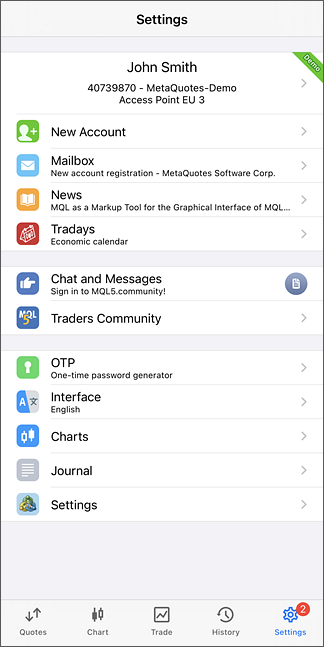 |
| --- | --- |
| \| After two hours of the application use, the "Write a Review" button appears at the bottom of the window. By tapping it, you will jump to the App Store to write a feedback on the MetaTrader 5 for iPhone. Your opinion is very important for the application developers. \|
\| --- \| | |
| After two hours of the application use, the "Write a Review" button appears at the bottom of the window. By tapping it, you will jump to the App Store to write a feedback on the MetaTrader 5 for iPhone. Your opinion is very important for the application developers. | |
## In this section
- [Charts](https://www.metatrader5.com/en/mobile-trading/iphone/help/settings/settings_charts)
- [Journal](https://www.metatrader5.com/en/mobile-trading/iphone/help/settings/settings_journal)
- [Settings](https://www.metatrader5.com/en/mobile-trading/iphone/help/settings/settings_about)
- [Certificates](https://www.metatrader5.com/en/mobile-trading/iphone/help/settings/settings_certificates)
```json
{"@context": "https://schema.org", "@type": "BreadcrumbList", "itemListElement": [ {"@type": "ListItem", "position": 1, "item": {"@id": "https://www.metatrader5.com/en/mobile-trading/iphone/help", "name": "MetaTrader 5 iPhone/iPad Help"}}, {"@type": "ListItem", "position": 2, "item": {"@id": "https://www.metatrader5.com/en/mobile-trading/iphone/help/settings", "name": "Settings"}} ]}
{ "@context": "https://schema.org", "@type": "FAQPage", "mainEntity": [{ "@type": "Question", "name": "MetaTrader 5: Settings", "acceptedAnswer": { "@type": "Answer", "text": "In this tab, you can configure various parameters of the MetaTrader 5 app for iPhone. To open the tab, use the bottom panel of the application. The..." } }] }
```