---
title: "Getting Started - MetaTrader 5 for iPhone - MetaTrader 5 iPhone/iPad Help"
description: "To start trading from your mobile device, download MetaTrader 5 on iTunes or from the AppStore application on your iPod... - Getting Started - MetaTrader 5 iPhone/iPad Help"
image: "https://www.metatrader5.com/i/logo_metatrader5.png"
url: "https://www.metatrader5.com/en/mobile-trading/iphone/help/getting_started"
---
[MetaTrader 5 iPhone/iPad Help](https://www.metatrader5.com/en/mobile-trading/iphone/help) → Getting Started
| # Getting Started
To start trading from your mobile device, download MetaTrader 5 on [iTunes](https://download.terminal.free/cdn/mobile/mt5/ios?hl=en&utm_campaign=metaquotes.download&utm_source=www.metatrader5.com)or from the AppStore application on your iPod Touch/iPhone/iPad.
After installation, run the application by tapping  on your device. This will open the following screen. The application version number is shown at the bottom of the screen.
\| - The app works on iPhone, iPad and iPod with iOS 9.0 or later, and on desktops with the M1 processor and macOS Big Sur or later.
- The MetaTrader 5 for iPhone requires a cellular connection or Wi-Fi.
- It is recommended that you update MetaTrader 5 regularly. New versions provide enhanced functionality and greater stability. \|
\| --- \| |  |
| --- | --- |
| - The app works on iPhone, iPad and iPod with iOS 9.0 or later, and on desktops with the M1 processor and macOS Big Sur or later.
- The MetaTrader 5 for iPhone requires a cellular connection or Wi-Fi.
- It is recommended that you update MetaTrader 5 regularly. New versions provide enhanced functionality and greater stability. | |
|  | ## Connecting to an Account and Opening a Demo Account
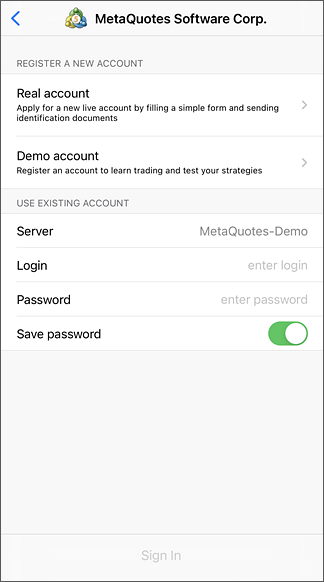
When you start the application for the first time, you will be offered the following options:
- Open a demo account should be used if you want to open a new demo account.
- Open a real account allows requesting a new real account from a selected broker. You will need to specify personal information and provide identification documents.
- Login to an existing account allows connecting with to an existing account.
Find detailed instructions on how to work with accounts in a [separate section](https://www.metatrader5.com/en/mobile-trading/iphone/help/settings_accounts). |
| ## Application GUI
The whole interface of the MetaTrader 5 mobile platform consists of the main working area and the bottom panel, designed to switch between the main functions of the program:
- [Quotes](https://www.metatrader5.com/en/mobile-trading/iphone/help/quotes) show information on real-time prices of financial instruments;
- [Chart](https://www.metatrader5.com/en/mobile-trading/iphone/help/chart) provides a price chart, technical analysis options that include indicators and graphical objects;
- [Trade](https://www.metatrader5.com/en/mobile-trading/iphone/help/trade) displays account state and features options for managing trade positions and pending orders;
- [History](https://www.metatrader5.com/en/mobile-trading/iphone/help/history) features the history of trading operations of the account;
- [Settings](https://www.metatrader5.com/en/mobile-trading/iphone/help/settings) provide access to application settings, MQL5.community chat, mailbox and news, as well as allow opening accounts or switching between available accounts. | 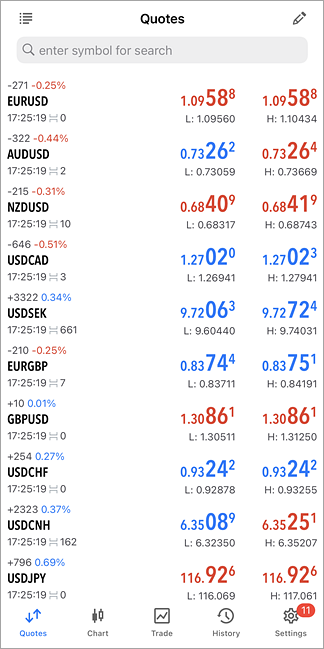 |
## In this section
- Getting Started
- [Quotes](https://www.metatrader5.com/en/mobile-trading/iphone/help/quotes)
- [Depth of Market](https://www.metatrader5.com/en/mobile-trading/iphone/help/depth_of_market)
- [Chart](https://www.metatrader5.com/en/mobile-trading/iphone/help/chart)
- [Trade](https://www.metatrader5.com/en/mobile-trading/iphone/help/trade)
- [History](https://www.metatrader5.com/en/mobile-trading/iphone/help/history)
- [Accounts](https://www.metatrader5.com/en/mobile-trading/iphone/help/settings_accounts)
- [Mailbox](https://www.metatrader5.com/en/mobile-trading/iphone/help/settings_mail)
- [News](https://www.metatrader5.com/en/mobile-trading/iphone/help/settings_news)
- [Messages](https://www.metatrader5.com/en/mobile-trading/iphone/help/settings_messages)
- [Push Notifications](https://www.metatrader5.com/en/mobile-trading/iphone/help/push)
- [Settings](https://www.metatrader5.com/en/mobile-trading/iphone/help/settings)
- [iPad Version](https://www.metatrader5.com/en/mobile-trading/iphone/help/ipad)
```json
{"@context": "https://schema.org", "@type": "BreadcrumbList", "itemListElement": [ {"@type": "ListItem", "position": 1, "item": {"@id": "https://www.metatrader5.com/en/mobile-trading/iphone/help", "name": "MetaTrader 5 iPhone/iPad Help"}}, {"@type": "ListItem", "position": 2, "item": {"@id": "https://www.metatrader5.com/en/mobile-trading/iphone/help/getting_started", "name": "Getting Started"}} ]}
{ "@context": "https://schema.org", "@type": "FAQPage", "mainEntity": [{ "@type": "Question", "name": "MetaTrader 5: Getting Started", "acceptedAnswer": { "@type": "Answer", "text": "To start trading from your mobile device, download MetaTrader 5 on iTunes or from the AppStore application on your iPod Touch/iPhone/iPad. After..." } }] }
```