---
title: "Managing Pending Orders - Trade - MetaTrader 5 for Android - MetaTrader 5 Android Help"
description: "During trading, you may need to modify a pending order : set a new activation price, change stop levels or its expiration... - Managing Pending Orders - Trade - MetaTrader 5 Android Help"
image: "https://www.metatrader5.com/i/logo_metatrader5.png"
url: "https://www.metatrader5.com/en/mobile-trading/android/help/trade/pending_change"
---
[MetaTrader 5 Android Help](https://www.metatrader5.com/en/mobile-trading/android/help) → [Trade](https://www.metatrader5.com/en/mobile-trading/android/help/trade) → Managing Pending Orders
| # Managing Pending Orders
During trading, you may need to modify a [pending order](https://www.metatrader5.com/en/mobile-trading/android/help/trade/general_concept/order_types#pending_order): set a new activation price, change stop levels or its expiration time. This can be done in the order editing window. In the same window, you can [delete](https://www.metatrader5.com/en/mobile-trading/android/help/trade/pending_change#delete) an order.
## Order Modification [#](#modify)
To modify a pending order, go to the ["Trade"](https://www.metatrader5.com/en/mobile-trading/android/help/trade#context) tab and run the "Modify order" command in the order context menu.
Almost all fields of a pending order can be modified, just like when you [place](https://www.metatrader5.com/en/mobile-trading/android/help/trade/pending_place) a new pending order, except for the volume. | 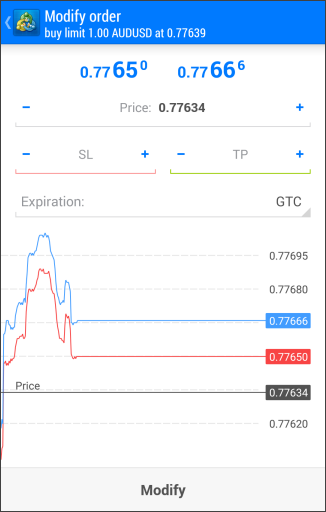 |
| --- | --- |
| After the necessary parameters have been set, press "Modify".
\| If the order parameters are incorrect, the "Modify" button is inactive. \|
\| --- \| | |
| If the order parameters are incorrect, the "Modify" button is inactive. | |
|  | ## Deleting Pending Orders [#](#delete)
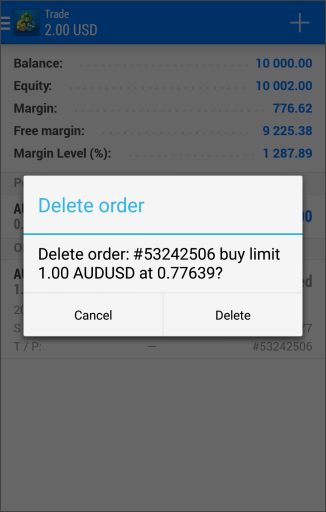
To delete a pending order, select "Delete order" in its context menu on the ["Trade"](https://www.metatrader5.com/en/mobile-trading/android/help/trade#context) tab.
Pending orders are deleted automatically at the time specified in the ["Expiration"](https://www.metatrader5.com/en/mobile-trading/android/help/trade/pending_place#expiration) field. In the ["History"](https://www.metatrader5.com/en/mobile-trading/android/help/history) tab, a deleted pending order is marked as "Canceled". |
## In this section
- [Trading Principles](https://www.metatrader5.com/en/mobile-trading/android/help/trade/general_concept)
- [Opening and Closing Positions](https://www.metatrader5.com/en/mobile-trading/android/help/trade/open_positions)
- [Close By](https://www.metatrader5.com/en/mobile-trading/android/help/trade/closeby)
- [Modifying a Position](https://www.metatrader5.com/en/mobile-trading/android/help/trade/change_positions)
- [Placing Pending Orders](https://www.metatrader5.com/en/mobile-trading/android/help/trade/pending_place)
- Managing Pending Orders
- [Bulk Operations](https://www.metatrader5.com/en/mobile-trading/android/help/trade/bulk_operations)
```json
{"@context": "https://schema.org", "@type": "BreadcrumbList", "itemListElement": [ {"@type": "ListItem", "position": 1, "item": {"@id": "https://www.metatrader5.com/en/mobile-trading/android/help", "name": "MetaTrader 5 Android Help"}}, {"@type": "ListItem", "position": 2, "item": {"@id": "https://www.metatrader5.com/en/mobile-trading/android/help/trade", "name": "Trade"}}, {"@type": "ListItem", "position": 3, "item": {"@id": "https://www.metatrader5.com/en/mobile-trading/android/help/trade/pending_change", "name": "Managing Pending Orders"}} ]}
{ "@context": "https://schema.org", "@type": "FAQPage", "mainEntity": [{ "@type": "Question", "name": "MetaTrader 5: Managing Pending Orders", "acceptedAnswer": { "@type": "Answer", "text": "During trading, you may need to modify a pending order : set a new activation price, change stop levels or its expiration time. This can be done in..." } }] }
```