---
title: "Mailbox - MetaTrader 5 for Android - MetaTrader 5 Android Help"
description: "The section allows you to work with the internal MetaTrader 5 mail system. All mails sent by a brokerage company are displayed... - Mailbox - MetaTrader 5 Android Help"
image: "https://www.metatrader5.com/i/logo_metatrader5.png"
url: "https://www.metatrader5.com/en/mobile-trading/android/help/settings_mail"
---
[MetaTrader 5 Android Help](https://www.metatrader5.com/en/mobile-trading/android/help) → Mailbox
| # Mail
The section allows you to work with the internal MetaTrader 5 mail system. All mails sent by a brokerage company are displayed here. Also, you can send a mail to the company's administrator if you have any questions.
The mail's subject, sender's name and a date are displayed in the list. To view an email, tap on it.
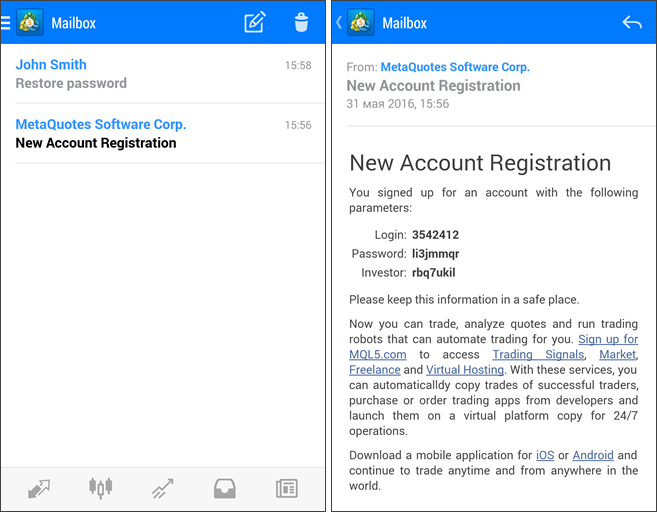
The headers of unread mails in the list are displayed in bold. | |
| --- | --- |
| ## Writing a Mail
To create a new mail, tap  button in the upper right corner of the screen. To reply an incoming mail, enter it and tap .
Select one of the available administrators in the 'To' field. Enter the mail's subject to Subject field. The text of a mail is entered below. To send an email, tap  button in the upper right corner of the screen.
You can attach image files and application logs to your email. Tap  and select a file from memory or other sources (such as Google Drive) available on your device. | 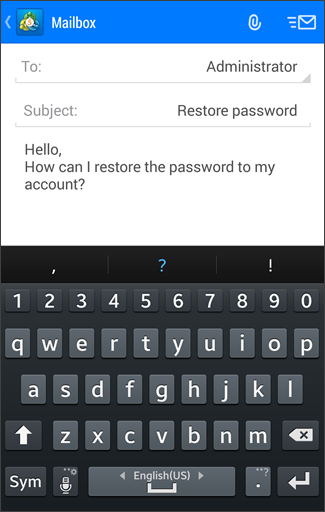 |
|  | ## Deleting Mails
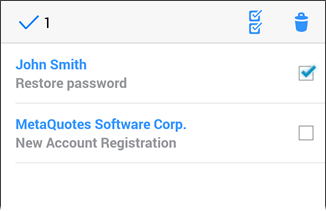
To delete emails, tap  at the top of the window. Then tick off all the messages you want to delete and once again tap . To select all emails, tap . |
## In this section
- [Getting Started](https://www.metatrader5.com/en/mobile-trading/android/help/getting_started)
- [Quotes](https://www.metatrader5.com/en/mobile-trading/android/help/quotes)
- [Depth of Market](https://www.metatrader5.com/en/mobile-trading/android/help/depth_of_market)
- [Charts](https://www.metatrader5.com/en/mobile-trading/android/help/chart)
- [Trade](https://www.metatrader5.com/en/mobile-trading/android/help/trade)
- [History](https://www.metatrader5.com/en/mobile-trading/android/help/history)
- [Accounts](https://www.metatrader5.com/en/mobile-trading/android/help/settings_accounts)
- Mailbox
- [News Event](https://www.metatrader5.com/en/mobile-trading/android/help/settings_news)
- [Messages](https://www.metatrader5.com/en/mobile-trading/android/help/messages)
- [Settings](https://www.metatrader5.com/en/mobile-trading/android/help/settings)
- [Journal](https://www.metatrader5.com/en/mobile-trading/android/help/settings_journal)
- [About](https://www.metatrader5.com/en/mobile-trading/android/help/settings_about)
- [Push Notifications](https://www.metatrader5.com/en/mobile-trading/android/help/push)
- [Tablet Version](https://www.metatrader5.com/en/mobile-trading/android/help/tablet)
```json
{"@context": "https://schema.org", "@type": "BreadcrumbList", "itemListElement": [ {"@type": "ListItem", "position": 1, "item": {"@id": "https://www.metatrader5.com/en/mobile-trading/android/help", "name": "MetaTrader 5 Android Help"}}, {"@type": "ListItem", "position": 2, "item": {"@id": "https://www.metatrader5.com/en/mobile-trading/android/help/settings_mail", "name": "Mailbox"}} ]}
{ "@context": "https://schema.org", "@type": "FAQPage", "mainEntity": [{ "@type": "Question", "name": "MetaTrader 5: Mailbox", "acceptedAnswer": { "@type": "Answer", "text": "The section allows you to work with the internal MetaTrader 5 mail system. All mails sent by a brokerage company are displayed here. Also, you can..." } }] }
```