---
title: "MetaEditor environment folders - MetaEditor Help"
description: "Before developing trading applications, users need to understand the data storage principles in the trading platform and... - MetaEditor environment folders - MetaEditor Help"
image: "https://www.metatrader5.com/i/logo_metatrader5.png"
url: "https://www.metatrader5.com/en/metaeditor/help/structure"
---
[MetaEditor Help](https://www.metatrader5.com/en/metaeditor/help) → MetaEditor environment folders
# MetaEditor environment folders
Before developing trading applications, users need to understand the data storage principles in the trading platform and MetaEditor.
All files for algorithmic trading (ready-made programs) and application development in MetaEditor environment are located in the /MQL5 (/MQL4) directory of the trading platform. To quickly jump to it, click  Open Data Folder in the [File](https://www.metatrader5.com/en/metaeditor/help/main_menu/main_menu_file#data_folder) menu. The directory location relative to the platform installation folder depends on the [MetaEditor launch mode](https://www.metatrader5.com/en/metaeditor/help/beginning/open).
Files in the /MQL5 (/MQL4) directory are located depending on their purpose and application type:
| Folders and files | Description |
| --- | --- |
| /Experts | Folder for storing compiled (*.ex5, *.ex4) and source files of EAs (*.mq5, *.mqh, *.mq4). |
| /Files | Folder for storing various files used by EAs and scripts. |
| /Images | Folder for storing *.bmp images used in programs. |
| /Include | Folder for storing common *.mqh files included in various programs. |
| /Indicators | Folder for storing compiled and source files of custom indicators. |
| /Libraries | Folder for storing MQL5/MQL4 libraries. |
| /Logs | Contains Expert Advisor log files (yyyymmdd.log). These files are created separately for each day of the EA operation, their names correspond to their creation date: yyyy stands for the year, mm – month, dd – date. |
| /Presets | This folder stores the sets of parameters for launching EAs (Input parameters). |
| /Scripts | Folder for storing compiled and source files of scripts. |
| /Shared Projects | Folder for working with [shared projects](https://www.metatrader5.com/en/metaeditor/help/mql5storage/projects#shared). |
| experts.dat | Contains the EA database. |
## MQL4/MQL5 application file structure
The files should be arranged carefully when developing MQL4/MQL5 applications. The correct arrangement of files greatly simplifies working with large projects.
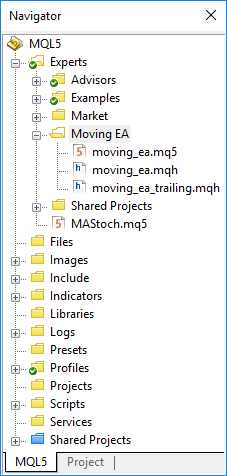
If you develop a trading robot, create a separate folder for it in the Experts directory. For indicators – in the Indicators directory, for scripts – in Scripts, etc. Place all files used for an application development in its folder except for common files (standard library, shared include files).
The [Navigator](https://www.metatrader5.com/en/metaeditor/help/workspace/navigator) window is used for managing the application structure.
| ```
#include
``` | |
| --- | --- |
|  | Creating folders and placing files
To create folders, use an OS explorer or the [Navigator](https://www.metatrader5.com/en/metaeditor/help/workspace/navigator) window. To create a sub-directory via the Navigator, select the necessary folder and click "New folder" in the context menu. Next, set the folder name and press Enter. To move a file to the created folder, simply drag it there (Drag'n'Drop).
File arrangement
During a [compilation](https://www.metatrader5.com/en/metaeditor/help/development/compile), executable program files (*.EX4 or *.EX5) are created in the same folder as the main source code file of a program (*.MQ4 or *.MQ5) or a [project](https://www.metatrader5.com/en/metaeditor/help/mql5storage/projects) file (MQPROJ).
The main file is an MQ4 or MQ5 file containing so-called entry points – predefined functions initializing the application operation (for example: OnInit, OnStart, OnChartEvent, etc.). The main file may include other MQ4, MQ5 and MQH files, although it is the main file that should be compiled to create an executable program file.
Consider the location of files when including them (*.MQH) to your program's code. If an include file is located in the same folder as the main one, use the following statement:
\| ```
#include "file_name.mqh"
``` \|
\| --- \|
If the file is located in the standard Include directory:
\| ```
#include
``` \|
\| --- \|
You can also specify a relative path to the file:
\| ```
#include "../folder_name/file_name.mqh"
``` \|
\| --- \| |
| ```
#include "file_name.mqh"
``` | |
| ```
#include "../folder_name/file_name.mqh"
``` | |
> All changes made to the directory and file structure via an OS explorer are automatically displayed in the Navigator window. If for some reason, these changes are not immediately displayed, run the [Refresh](https://www.metatrader5.com/en/metaeditor/help/workspace/navigator#refresh) command in the context menu of the Navigator or press F5.To create an executable program file, compile its main source file. This is a file containing the entry points – predefined functions initializing the application operation (for example: OnInit, OnStart, OnChartEvent, and so on).
## In this section
- [Launch](https://www.metatrader5.com/en/metaeditor/help/beginning/open)
- [Settings](https://www.metatrader5.com/en/metaeditor/help/beginning/settings)
- [Integration with other IDEs](https://www.metatrader5.com/en/metaeditor/help/beginning/integration_ide)
- [Main menu](https://www.metatrader5.com/en/metaeditor/help/main_menu)
- [Toolbars](https://www.metatrader5.com/en/metaeditor/help/toolbar)
- [Workspace](https://www.metatrader5.com/en/metaeditor/help/workspace)
- [Projects and MQL5 Algo Forge](https://www.metatrader5.com/en/metaeditor/help/mql5storage)
- [MQL4/MQL5 Wizard](https://www.metatrader5.com/en/metaeditor/help/mql5_wizard)
- [Developing programs](https://www.metatrader5.com/en/metaeditor/help/development)
- [Working with SQL data bases](https://www.metatrader5.com/en/metaeditor/help/database)
- [Working with machine learning models](https://www.metatrader5.com/en/metaeditor/help/machine_learning)
- [Example of developing a program](https://www.metatrader5.com/en/metaeditor/help/project_example)
- MetaEditor environment folders
- [MQL5.community: Community of Traders](https://www.metatrader5.com/en/metaeditor/help/mql5community)
- [Built-in help](https://www.metatrader5.com/en/metaeditor/help/mql5_help)
- [Articles on the development of trading applications](https://www.metatrader5.com/en/metaeditor/help/articles)
- [Trading platform video guides](https://www.metatrader5.com/en/metaeditor/help/video_guides)
```json
{"@context": "https://schema.org", "@type": "BreadcrumbList", "itemListElement": [ {"@type": "ListItem", "position": 1, "item": {"@id": "https://www.metatrader5.com/en/metaeditor/help", "name": "MetaEditor Help"}}, {"@type": "ListItem", "position": 2, "item": {"@id": "https://www.metatrader5.com/en/metaeditor/help/structure", "name": "MetaEditor environment folders"}} ]}
{ "@context": "https://schema.org", "@type": "FAQPage", "mainEntity": [{ "@type": "Question", "name": "MetaTrader 5: MetaEditor environment folders", "acceptedAnswer": { "@type": "Answer", "text": "Before developing trading applications, users need to understand the data storage principles in the trading platform and MetaEditor. All files for..." } }] }
```